 Soulsolid
Title here
Summary here
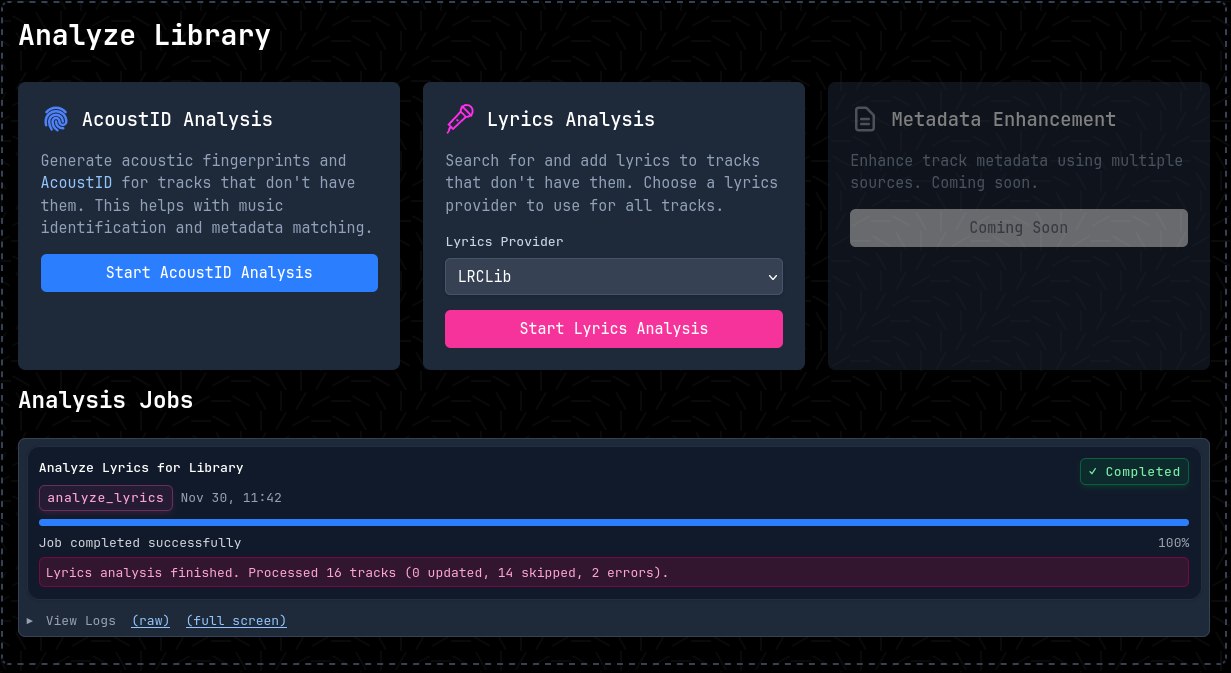 The analyze feature aims to run an analysis of the metadata of your library and fill those missing gaps.
At the moment, jobs for adding AcoustID and Lyrics are available. More analysis will be added in future releases of Soulsolid.
The AcoustID analysis job computes acoustic fingerprints for your audio tracks and matches them against the AcoustID database. This helps identify songs accurately, filling in missing or incorrect metadata such as track titles, artists, albums, and other tags. It’s particularly useful for tracks with incomplete information or those obtained from unknown sources.
The Lyrics analysis job searches for and adds lyrics to your tracks using configured providers. Currently supported providers include:
The job attempts to fetch lyrics for all tracks. For tracks that already have lyrics, you can control the behavior with two options available in the UI:
If neither option is set, tracks with differing existing lyrics are sent to the lyrics queue for manual review. See the Importing docs for queue type details.
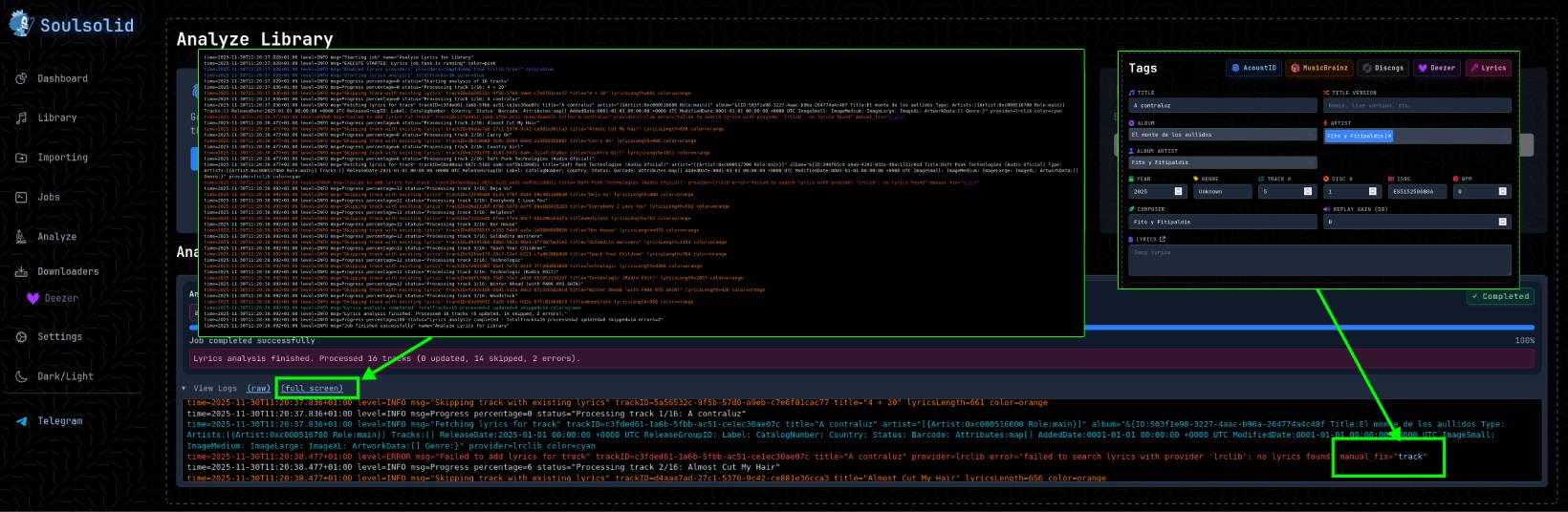
This is how the jobs logs look like. You’ll be able to browse over these logs and see which tracks could be processed correctly and which tracks failed. For those which failed, you’ll be able to manually fix them by clicking on manual_fix="track".
time=2025-11-30T11:42:34.416+01:00 level=INFO msg="Starting job" name="Analyze Lyrics for Library"
time=2025-11-30T11:42:34.416+01:00 level=INFO msg="EXECUTE STARTED: Lyrics job task is running" color=pink
time=2025-11-30T11:42:34.416+01:00 level=INFO msg="Enabled lyrics providers" providers="map[dummy:true lrclib:true]" color=blue
time=2025-11-30T11:42:34.416+01:00 level=INFO msg="Starting lyrics analysis" totalTracks=16 color=blue
time=2025-11-30T11:42:34.416+01:00 level=INFO msg=Progress percentage=0 status="Starting analysis of 16 tracks"
time=2025-11-30T11:42:34.424+01:00 level=INFO msg=Progress percentage=0 status="Processing track 1/16: 4 + 20"
time=2025-11-30T11:42:34.424+01:00 level=INFO msg="Skipping track with existing lyrics" trackID=5a56532c-9f5b-57d0-a9eb-c7e6f81cac77 title="4 + 20" lyricsLength=661 color=orange
time=2025-11-30T11:42:36.890+01:00 level=ERROR msg="Failed to add lyrics for track" trackID=c3fded61-1a6b-5fbb-ac51-ce1ec30ae07c title="A contraluz" provider=lrclib error="failed to search lyrics with provider 'lrclib': no lyrics found" manual_fix="track"
time=2025-11-30T11:42:36.890+01:00 level=INFO msg=Progress percentage=6 status="Processing track 2/16: Almost Cut My Hair"
time=2025-11-30T11:42:36.890+01:00 level=INFO msg="Skipping track with existing lyrics" trackID=d4aaa7ad-27c1-5370-9c42-ce881e36cca3 title="Almost Cut My Hair" lyricsLength=656 color=orange
time=2025-11-30T11:42:36.890+01:00 level=INFO msg=Progress percentage=6 status="Processing track 2/16: Carry On"
time=2025-11-30T11:42:36.890+01:00 level=INFO msg="Skipping track with existing lyrics" trackID=3b3c0e60-3c8c-5694-8eed-213656355b0f title="Carry On" lyricsLength=906 color=orange
time=2025-11-30T11:42:38.569+01:00 level=INFO msg="Lyrics analysis completed" totalTracks=16 processed=2 updated=0 skipped=14 color=green